
Corporate Design & Video Team
Motorola Solutions builds and connects technologies that focus on collaboration between public safety agencies and enterprises. Their internal creative team handles a high-volume mix of promotional designs, website support, video production, and digital marketing activities.
Strategic Priorities
These features were essential to support the team’s workflow and enable real improvement.
1.
In-app proofing + review
A structured proofing and review app that supported documents, images, video, and animation assets — and clearly connected tasks, reviews, and documentation — was essential for the team’s day-to-day work.
2.
Stakeholder visibility
With 150+ internal clients requesting work across 5 corporate departments, the team needed a way to provide self-serve project status and timing visibility to stakeholders who didn’t have internal system access.
3.
Controlled project intake
The project request workflow required strong guardrails and clarity on timing expectations for many different types of deliverables. Rush or last-minute requests had to be justified, labelled, and documented for accountability.
4.
Workload management
Even a 15-person team needs careful resourcing, scheduling, and planning to stay creative and avoid burnout. The team was looking for a way not only to schedule incoming tasks but to clearly document work volume over time.
System Highlights
Read more about each of the strategies and solutions I implemented for this system.
-
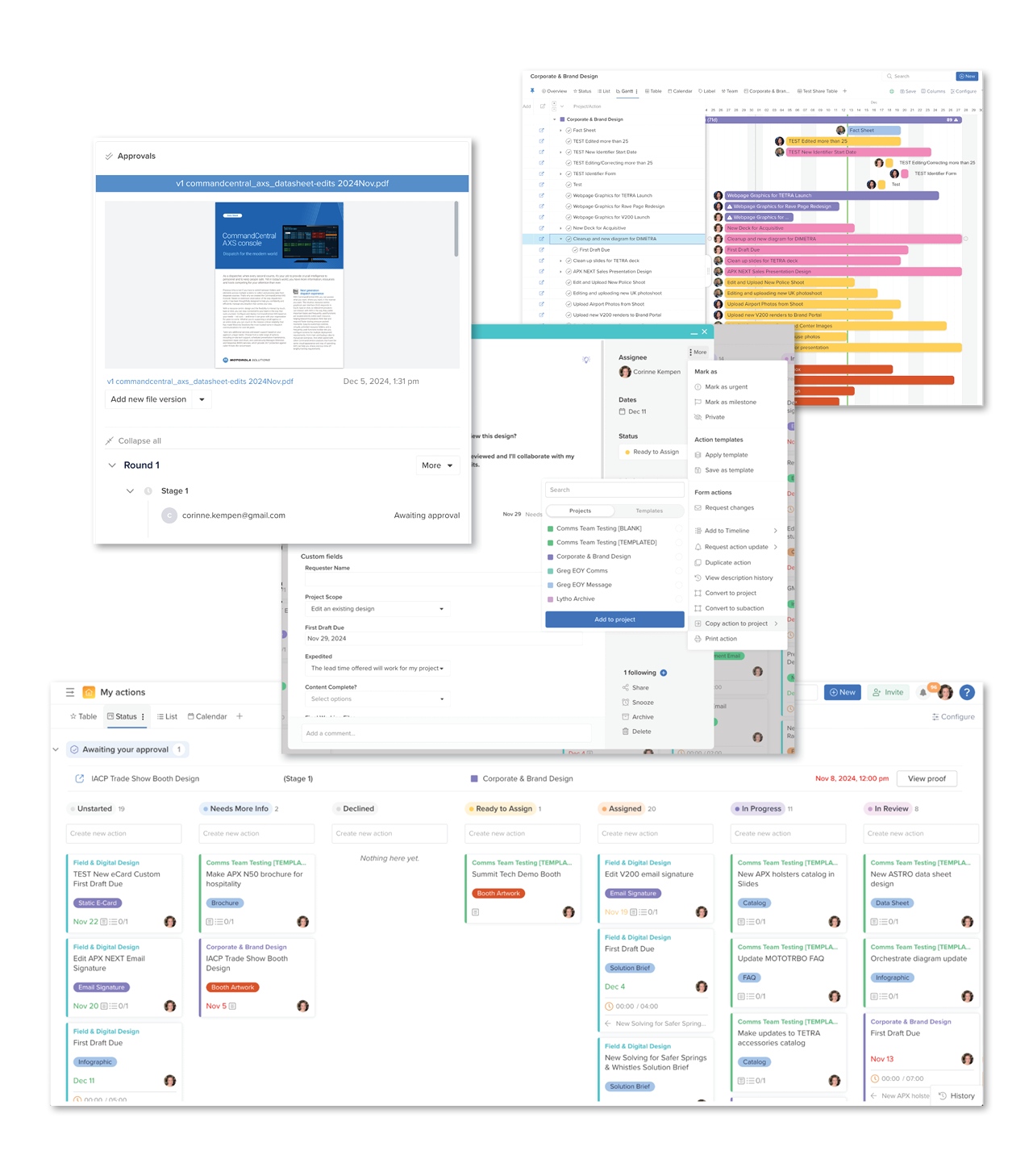
Based on established workflows and specialty skills / roles within the team, I developed a system structure and hierarchy that uses Labels, Custom Fields, and logic-based Workflow automations to standardize the way tasks are organized and displayed in the system.
This enables flexible and customizable work views and maximizes the team’s reporting ability by keeping datapoints consistent and easy to capture. -
By creating one intake form per specialty team (Corporate & Brand, Digital Marketing & Sales Support, and Video & Animation) I engineered forms that dynamically evolve, selection by selection, to capture the exact direction and context needed for each and every design / video asset.
Form submissions are instantly converted into tasks that contain all the details needed for scheduling and creative work.
This also enables the team to lock due date selection within specific achievable lead times — “rush” requests outside of the approved lead times need to be flagged and appended with extra context, and are then automatically tagged for reporting. -
Even the smartest system design is useless if it doesn’t properly consider the people who use it every day and the way that tasks move between them from submission to delivery.
Once the system structure was approved and I’d assessed how each of Hive’s system features and apps should be used for this particular workflow, I created a parallel strategy that outlines each step team members should take — from assessing submissions to assigning tasks to completing creative work.
The steps are streamlined and consistent, empowering each team member to build confidence and a sense of everyday familiarity with the way work flows through the system. -
To provide self-serve visibility into project status and overall team workload — and cut down on “when will my request be ready?” emails and pings from 150+ individual requesters — I created a live project dashboard that requesters and stakeholders can bookmark for easy reference.
This dashboard displays a list of all submitted tasks with a very high-level set of information for each task — asset type, requester name, assignee, due date, and status. This addresses 90% of the “check-in” questions that designers and videographers used to receive on a daily basis.
By organizing the list by due date and including additional stats about how many active tasks the team was currently working on (and how many they’d completed to date for the year) this dashboard also served to remind individual requesters that the team was handling an incredible volume and variety of projects every day.
“Why isn’t my project done yet?” emails decreased and gratitude increased. -
The Hive Resourcing tool (available as an optional app with Teams and Enterprise licenses) picks up each tasks’s start date, due date, assignee, and time estimate and uses them to show a visual, quantified representation of each team member’s workload.
In order to cut down on project-management admin time, I worked with a system-automation expert referred by the Hive team to pre-program a time estimate value for each asset type delivered by the creative team.
Once new requests are paired with time estimate values, tasks appear in the Resourcing app instantly — providing a live update of each team member’s workload as soon as a new request is submitted. -
In order to set the creative team, their managers, and their stakeholders up for success through a huge system change, I wrote and published a set of companion documents and a microsite that clearly provided an introduction, FAQ, and training references for anyone who interacted with the new process.
By acknowledging the change and its inevitable learning curve with compassion, curiosity, and a sense of positivity, I was able to proactively address concerns and quickly direct stakeholders to existing resources — without burning too much time on individual training and change management.